
Small hospitals have
big privileging needs.
Finally, a
platform built for that.
DoxApply was designed from day one for small hospitals. Not scaled down from an enterprise product. Not stripped of features until it’s cheap enough. Built specifically for facilities like yours, where a small staff handles medical staff services, compliance, and probably three other jobs.


The Problem You are Living With
Running a small hospital means wearing a dozen hats, and privileging is the last thing you have time for. The requirements for privileging your medical staff are exactly the same as for a large hospital. CMS and The Joint Commission don't adjust their standards based on your facility size, but your budget and staffing do. Managing privileging manually with error-prone spreadsheets, loose paper forms, and constant compliance anxiety is a recipe for disaster. DoxApply is here to help you get audit-ready in minutes, not months.
What DoxApply Solves for Your Hospital
Survey-Ready Files, Always
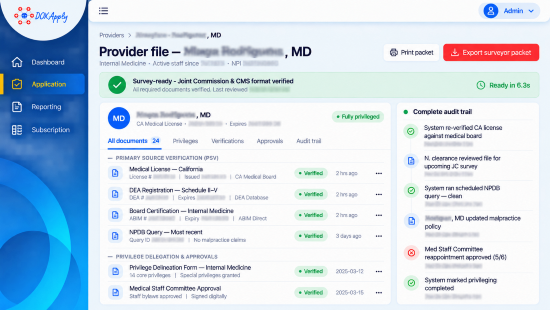
DoxApply maintains your credentialing and privileging documentation in exactly the format that CMS surveyors and Joint Commission reviewers expect. Every provider file is organized with verified primary source documentation, privilege delineation records, staff approval documentation, and a complete audit trail. When a surveyor asks to see a doctor's file, you pull it up in seconds, not hours.
Automated Expiration Tracking
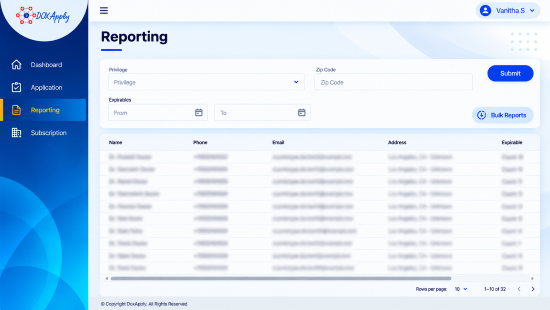
Every medical license, board certification, DEA registration, and malpractice insurance policy has an expiration date. In a small hospital, tracking these manually across even a dozen providers creates real risk of something falling through the cracks. DoxApply monitors every expiration date across every provider and sends escalating alerts at 90, 60, and 30 days before any credential lapses.
Medical Staff Routing and Approval Workflows
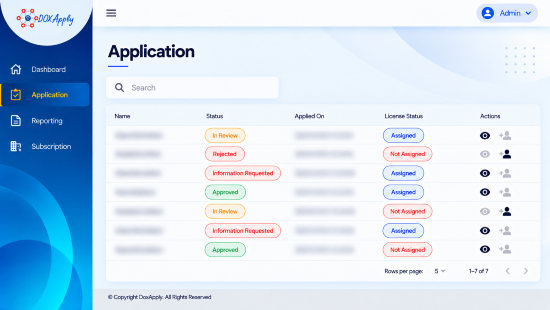
Privileging isn’t just about collecting documents. It requires structured review by appropriate staff. DoxApply digitizes this entire workflow. Applications are routed to the right reviewers, approvals are tracked and timestamped, and the entire decision chain is documented automatically. No more passing paper folders between committee members and hoping nothing gets lost.
Provider Self-Service Portal
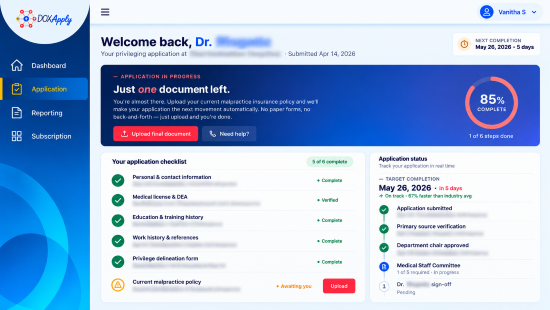
Instead of mailing application packets to physicians and waiting weeks for them to return incomplete forms, DoxApply gives providers a self-service portal where they submit their application, upload supporting documents, and track their own status. This cuts your application turnaround time dramatically and eliminates the back-and-forth that slows down onboarding.
How It Works
Free your staff and board from manual approval loops for days.
Physician Submits Application
The physician receives a link to DoxApply and logs in to complete their profile. They enter their education, training, and work history, and upload their documents (CV, license, DEA, board certificate). The system validates the input, ensuring all required fields are complete and documents are attached.
Automated Credential Verification
Once the application is submitted, DoxApply automatically runs primary source verification checks. The platform connects directly to databases like NPI Registry, AMA Profile Service, state licensing boards, and Office of Inspector General (OIG). Discrepancies are flagged, and verification reports are generated in seconds.
Privilege Delineation
The system lists the requested privileges based on the provider's specialty and experience. The credentialing specialist can review and customize the privileges as needed, matching the provider's qualifications with the facility's scope of service.
Staff Review and Approval
The completed application, verification reports, and privilege list are routed to the credentials committee, medical executive committee (MEC), and finally the governing board. Members can review documents and sign off digitally, replacing paper-based binders and approval meetings.
Privileges Granted and Monitoring Begins
Once approved, the provider is notified and can begin practicing. DoxApply starts continuous monitoring of their credentials, checking for changes in license status, exclusions, and upcoming expirations, keeping your facility audit-ready at all times.
See DoxApply Working for a Facility Like Yours
Most small hospitals can be up and running on DoxApply in less than 30 minutes. Schedule a demo or start your free trial to see how easy credentialing can be.